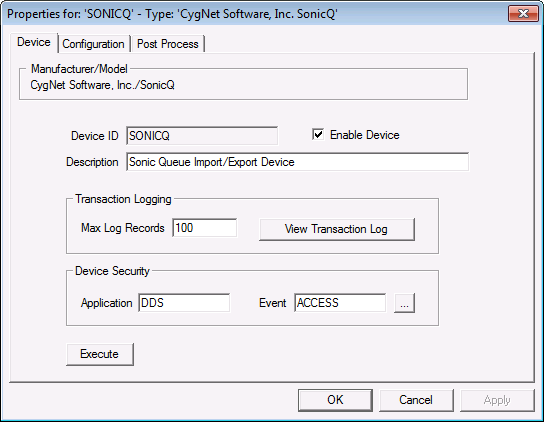
The properties for each section of this page are described below.
| Property | Description |
|---|---|
|
Device Settings |
|
|
Device ID |
The unique identifier of an instance for this device. This free-form name must be unique in the DDS and the FAC. That is, it must be a name not used by any other communication device, import/export device, remote device, or facility. Valid characters are A-Z, 0-9, dash (-), underscore (_), and tilde (~). No spaces are allowed. 20 character maximum. Note: Tilde (~) is a valid character for both devices and facilities, but its use is not recommended. |
|
Enable Device |
Check to enable or disable the device. The default setting is disabled. The device will automatically disable if an invalid configuration is detected. The device can be re-enabled after the invalid configuration is fixed. |
|
Description |
A free-form description of the device. 32 character maximum. |
|
Transaction Logging |
|
|
Max Log Records |
The maximum number of transaction history records that can be maintained for the device. Each UIS command executed by the device will generate a single transaction log. If the device is setup for active monitoring, one transaction will be created whenever a new file is detected. If multiple files are detected at the same time, it will still result in one transaction. |
|
View Transaction Log |
Click to view transaction and status log entries. |
|
Device Security |
|
|
Application |
Defines the ACS security application name used to validate the users of this device. See Applications, Events, Permissions. |
|
Event |
Defines the ACS security event used to validate users of this device. Click … to select the security event. See Applications, Events, Permissions. |
|
Execute |
This button will send the IMPORT or EXPORT command to the Sonic Queue device. |

|
|
|

